Introduction
本文旨在记录作者完成课程任务 Computer Architecture Lab 4~5 的过程,可供参考。
本实验需要完成的内容包括
- 实验四:在模板代码基础上完成 CUDA 矩阵乘法的实现。
- 验证 GPU 矩阵乘法结果的正确性;
- 测试不同规模的矩阵乘法,观察实验结果。
- 实验五:使用共享内存优化矩阵乘法
实验包链接如下(需校内网)
指导书链接如下(需校内网)
环境配置
实验要求使用 x86_64 Linux 并且安装 NVIDIA 显卡的实体机/物理机 完成
环境检查
输入下面的命令进行检查
# GPU 型号与驱动状态
nvidia-smi

# CUDA 编译器
nvcc --version

# GCC / G++
gcc --version
g++ --version

# 当前内核
uname -r

# 系统识别到的 NVIDIA PCI 设备
lspci | grep -i nvidia
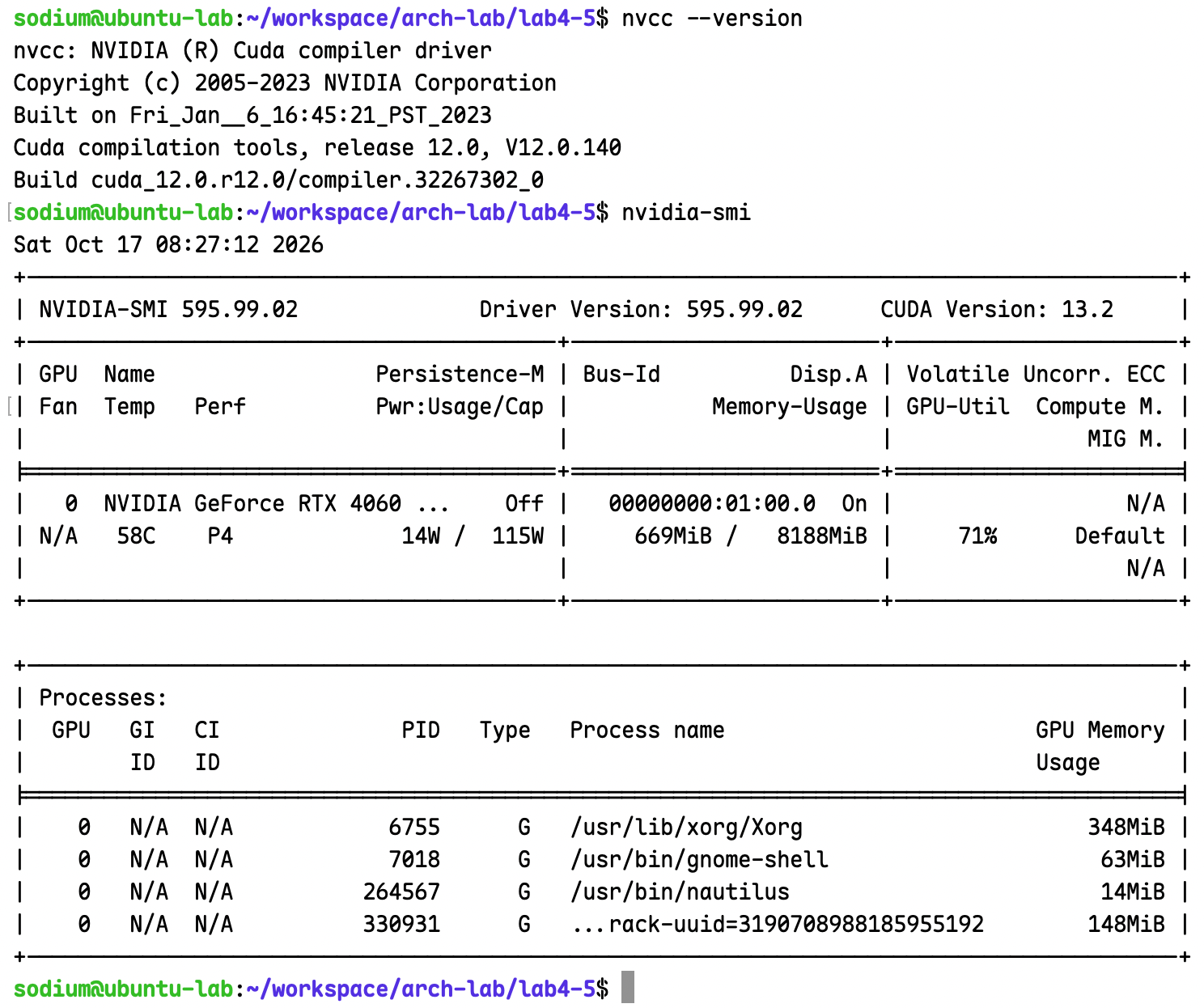
上面为实验中所用环境,内核版本 6.8.0-146-generic
基础环境配置
sudo apt update
sudo apt install -y build-essential net-tools git vim cmake gdb make gfortran libnuma-dev libtirpc-dev
测试环境是否安装成功
cmake -version
gcc --version
gdb --version
perf 安装
uname -r
先查看 Linux 内核版本号,可能会出现类似下面的结果
$ uname -r
6.8.0-137-generic
然后通过 apt 命令安装对应版本的工具
sudo apt install linux-tools-6.8.0-137-generic
安装完成后可以查看 perf 支持的性能事件
sudo perf list
NVIDIA 显卡驱动安装
sudo apt update
sudo apt install -y ubuntu-drivers-common

# 查看适合当前硬件的驱动
ubuntu-drivers devices

# 自动安装推荐驱动
sudo ubuntu-drivers install

# 重启以加载驱动
sudo reboot
检查
nvidia-smi
CUDA Toolkit
cd /tmp
wget https://developer.download.nvidia.com/compute/cuda/repos/ubuntu2204/x86_64/cuda-keyring_1.1-1_all.deb
sudo dpkg -i cuda-keyring_1.1-1_all.deb
sudo apt update
sudo apt install -y cuda-toolkit
先看看 CUDA 安装目录:
ls -d /usr/local/cuda*
如果安装目录是 /usr/local/cuda,可以把以下内容加入 ~/.bashrc:
cat >> ~/.bashrc <<'EOF'

# CUDA Toolkit
export PATH=/usr/local/cuda/bin:$PATH
export LD_LIBRARY_PATH=/usr/local/cuda/lib64${LD_LIBRARY_PATH:+:$LD_LIBRARY_PATH}
EOF

source ~/.bashrc
如果使用的是 Zsh,则应写入 ~/.zshrc。注意,LD_LIBRARY_PATH 不是所有系统都必须设置;如果系统已经通过标准库路径或配置好的动态链接器找到 CUDA 库,可以不设置它。
which nvcc
nvcc --version
nvidia-smi
实验四:在模板代码基础上完成 CUDA 矩阵乘法的实现
首先下载实验包并解压
sodium@ubuntu-lab:~/workspace/arch-lab$ curl -OL http://10.249.14.10:3011/lab4-5.tar.gz
  % Total    % Received % Xferd  Average Speed   Time    Time     Time  Current
                                 Dload  Upload   Total   Spent    Left  Speed
100  2603  100  2603    0     0   519k      0 --:--:-- --:--:-- --:--:--  635k
sodium@ubuntu-lab:~/workspace/arch-lab$ file lab4-5.tar.gz
lab4-5.tar.gz: gzip compressed data, last modified: Thu Dec  5 01:29:35 2024, from Unix, original size modulo 2^32 10240
sodium@ubuntu-lab:~/workspace/arch-lab$ tar -xvzf lab4-5.tar.gz lab4-5
lab4-5/
lab4-5/compile.sh
lab4-5/matrix_mul.cu
打开 matrix_mul.cu 里面的内容如下
- 头文件和命名空间
<iostream>,<cstdio>包含 C++ 和 C 的标准I/O接口,包括std::cout、std::cin、std::cerr和std::printf、std::fprintf、std::sprintf等<cuda_runtime.h>包含 CUDA Runtime 的常用接口和相关声明cudaMalloc(&d_a, size);cudaMemcpy(d_a, h_a, size, cudaMemcpyHostToDevice);cudaFree(d_a);cudaDeviceSynchronize();
<cublas_v2.h>是 cuBLAS 线性代数库,这里暂时用不到<device_launch_parameters.h>是 Kernel 启动相关声明<cmath>提供std::sqrt、std::sin、std::cos、std::pow、std::fabs等数学函数using namespace std在本文件中可以将std::xx简化为xx
MatrixMulSharedMemKernel: 共享内存的矩阵乘法内核函数,这里暂时用不到MatrixMulKernel: 二维矩阵乘法内核函数,是本实验需要补充的部分matrixMulCPU: 矩阵乘法,但是由 CPU 来执行,普通的 ijk 遍历printDiff: 检查 CPU 和 GPU 计算结果差异并打印出来getArg: 检查argc,argv并获得输入参数size和checkmain:- 输入
size得到参数m=n=k=size - 分配 CPU 内存和 GPU 内存存放矩阵 M, N, P, 矩阵 P = M * N
- 初始化 CPU 内存中的矩阵,填充数据
- 用
cudaMemcpy拷贝 CPU 的矩阵数据到 GPU 中 - 使用
cudaEvent_t以及相关函数记录计算用时 - 定义
grid和block,其中block大小为TILE_WIDTH*TILE_WIDTH CUBLAS部分暂不理会- 重复
nIter次调用MatrixMulKernel<<<grid, block>>>(d_M, d_N, d_P, m); - 记录计算用时、打印算力等相关信息
- 将 GPU 计算结果拷贝回内存,如果
check==1调用matrixMulCPU和printDiff进行检查 - 释放所有资源,结束程序
- 输入
补充 MatrixMulKernel
原本的函数如下
//! For square matrices only
__global__ void MatrixMulKernel(float* d_M, float* d_N, float* d_P, int width)
{
  // Calculate the row index of the P element and M
  // *** TO DO: Compute the row index for the current thread ***
  // int row = ...;

  // Calculate the column index of the P element and N
  // *** TO DO: Compute the column index for the current thread ***
  // int col = ...;

  // Ensure the thread is within bounds
  if ( (row < width) && (col < width) ) {
    // float pValue = 0.0;

    // Each thread computes one element of the matrix
    // *** TO DO: Implement the matrix multiplication for a single element ***


    // Store the computed value into the output matrix
    // *** TO DO: Write the computed value to the correct position in d_P ***
    // d_P[row * width + col] = ...;

  }
}
这里 __global__ 表示 CPU 调用,GPU 执行
参照一个向量加法的内核函数
// Device核函数(运行在GPU的硬件线程上)
__global__ void matrixAdd(float A[Ny][Nx], float B[Ny][Nx], float C[Ny][Nx])
{
    // 获取矩阵元素的行号、列号
    int row = blockIdx.y * blockDim.y + threadIdx.y;
    int col = blockIdx.x * blockDim.x + threadIdx.x;

    C[row][col] = A[row][col] + B[row][col];
}
可以通过 block.Idx, blockDim, threadIdx 获取线程的编号
查看 main 函数调用时的情况
const int TILE_WIDTH = 16;  // 定义块block大小
dim3 grid((int)ceil(k*1.0 / TILE_WIDTH), (int)ceil(m*1.0/ TILE_WIDTH));
dim3 block(TILE_WIDTH, TILE_WIDTH);
MatrixMulKernel<<<grid, block>>>(d_M, d_N, d_P, m);
这里 grid 是 ceil(k*1.0) * ceil(m*1.0/TILE_WIDTH),block 大小为 16 乘以 16,也就是矩阵被分成了16乘16大小的块,每个线程都可以分到一个位置,进行相应的乘法计算( $ c_{i,j}=a_{i,1}b_{1,j}+a_{i,2}b_{2,j}+…+a_{i,n}b_{n,j} $ )。
可以直接照抄上面的加法函数,给出一个补充完后的函数如下
//! For square matrices only
__global__ void MatrixMulKernel(float* d_M, float* d_N, float* d_P, int width)
{
  // Calculate the row index of the P element and M
  // *** TO DO: Compute the row index for the current thread ***
  int row = blockIdx.y * blockDim.y + threadIdx.y;

  // Calculate the column index of the P element and N
  // *** TO DO: Compute the column index for the current thread ***
  int col = blockIdx.x * blockDim.x + threadIdx.x;

  // Ensure the thread is within bounds
  if ( (row < width) && (col < width) ) {
    float pValue = 0.0;

    // Each thread computes one element of the matrix
    // *** TO DO: Implement the matrix multiplication for a single element ***
    for (int i=0; i<width; i++){
      pValue += d_M[row * width +i] * d_N[i * width + col];
    }

    // Store the computed value into the output matrix
    // *** TO DO: Write the computed value to the correct position in d_P ***
    d_P[row * width + col] = pValue;
  }
}
运行
完成后,尝试编译运行
bash compile.sh
./a.out 1 1000
发现报错了
sodium@ubuntu-lab:~/workspace/arch-lab/lab4-5$ bash compile.sh
nvcc fatal   : Value 'compute_35' is not defined for option 'gpu-architecture'
sodium@ubuntu-lab:~/workspace/arch-lab/lab4-5$ cat compile.sh
nvcc -arch=compute_35 -L/usr/local/cuda/lib64 -lcublas ./matrix_mul.cu
这个错误的原因是:当前安装的 CUDA Toolkit 已经不再支持 compute_35,也就是 NVIDIA Compute Capability 3.5 的编译目标。compute_35 对应较老的 Kepler 架构,而你的 RTX 4060 Laptop 使用的是 Ada Lovelace 架构,Compute Capability 为 8.9。需要修改编译参数。
nvcc -arch=sm_89 -L/usr/local/cuda/lib64 -lcublas ./matrix_mul.cu
sodium@ubuntu-lab:~/workspace/arch-lab/lab4-5$ sh compile.sh
./matrix_mul.cu(203): warning #177-D: variable "alpha" was declared but never referenced

Remark: The warnings can be suppressed with "-diag-suppress <warning-number>"

./matrix_mul.cu(204): warning #177-D: variable "beta" was declared but never referenced

./matrix_mul.cu(18): warning #177-D: variable "BLOCK_SIZE" was declared but never referenced
直接运行,结果如下
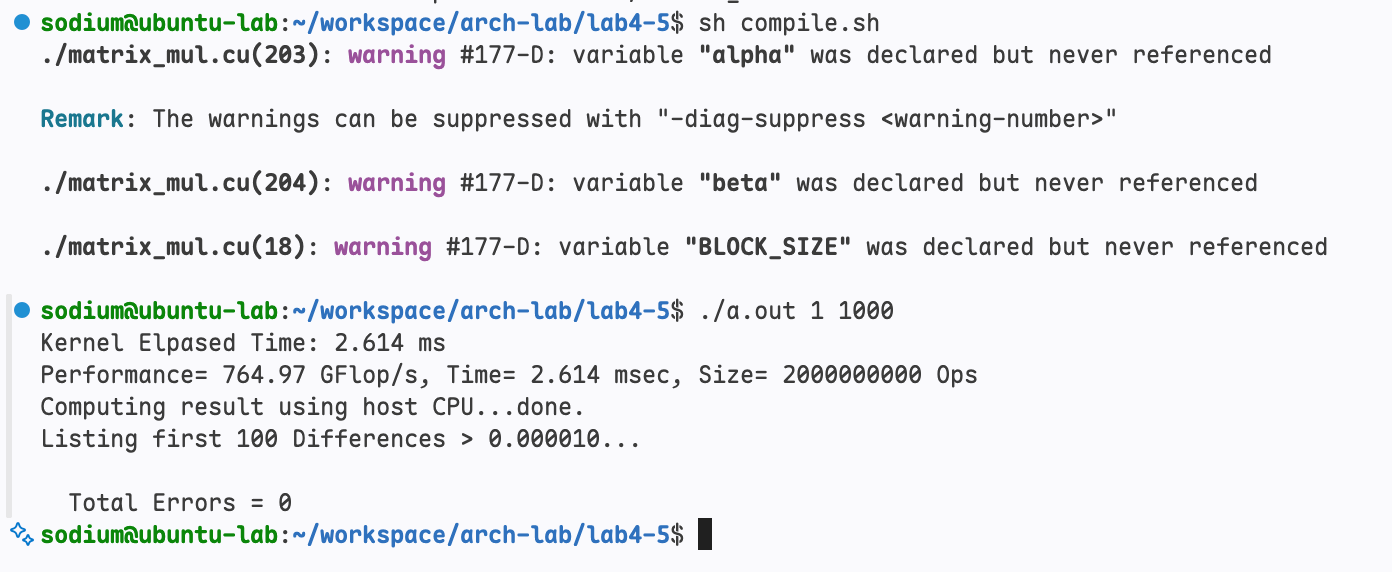
更改矩阵的尺寸进行计算
./a.out 0 1000
./a.out 0 3000
./a.out 0 5000
./a.out 0 10000
./a.out 0 20000
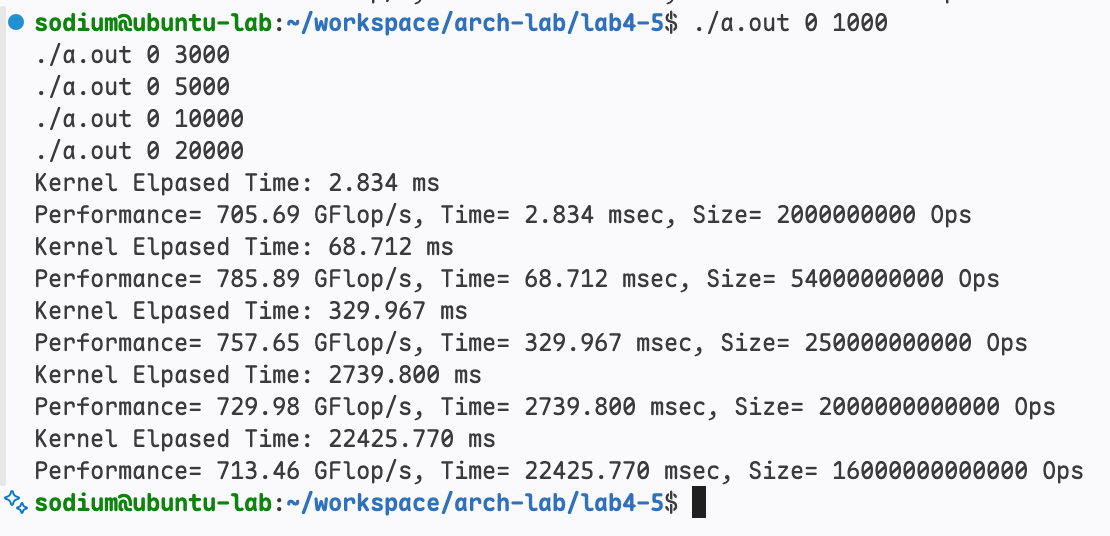
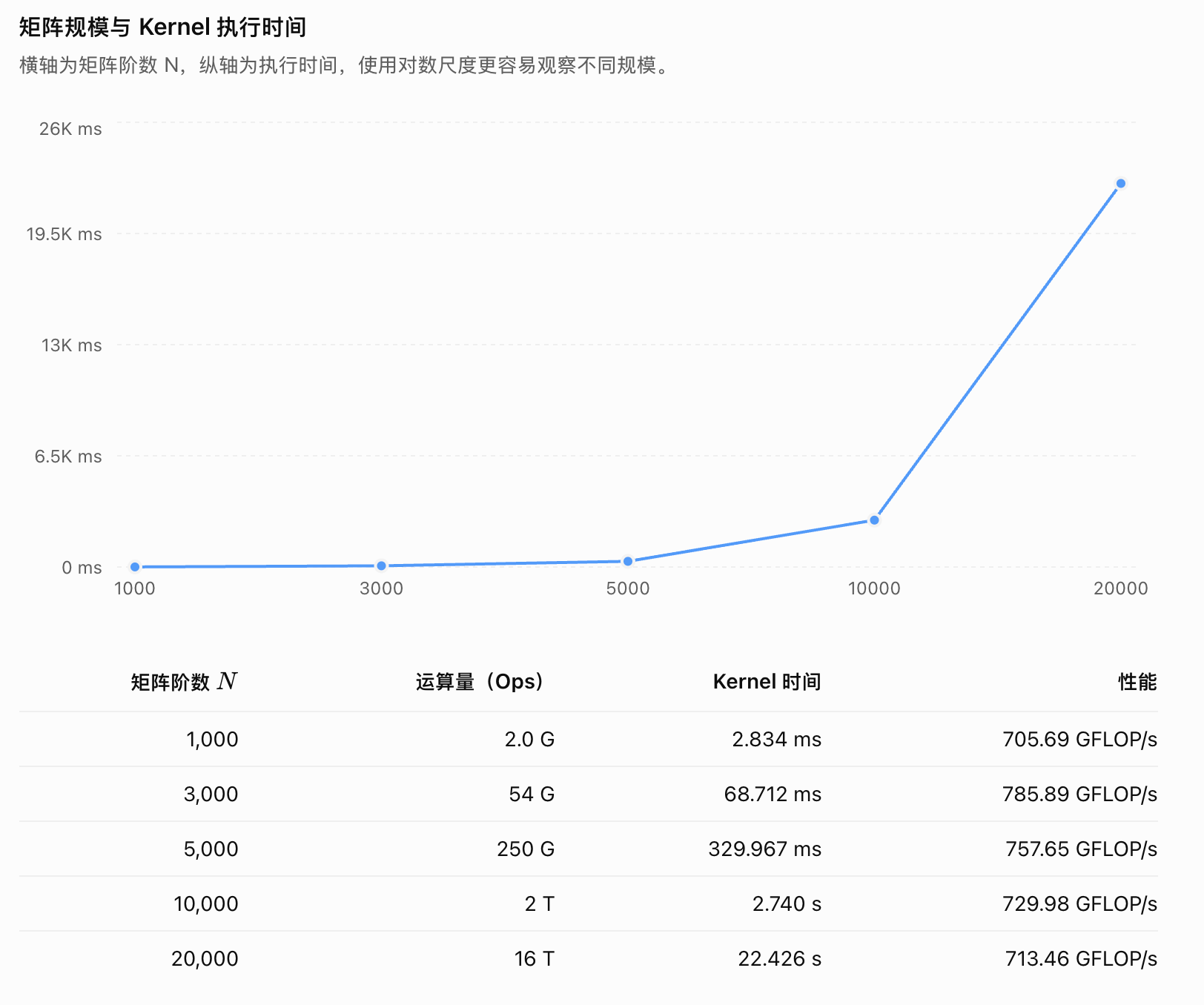
更改 block 大小,默认值是16,现在改成 8,32,64 分别尝试
| 每个维度的长度 | Block 配置 | 每个 Block 的线程数 | Warp 数(32 threads/warp) |
|---|---|---|---|
| 8 | dim3(8, 8) | 64 | 2 |
| 16 | dim3(16, 16) | 256 | 8 |
| 32 | dim3(32, 32) | 1024 | 32 |
| 64 | dim3(64, 64) | 4096 | 不合法 |
sh compile.sh && ./a.out 0 1000 && ./a.out 0 3000 && ./a.out 0 5000 &&./a.out 0 10000 && ./a.out 0 20000
下图中第一份是32,第二份是8,第三份重跑了一次16
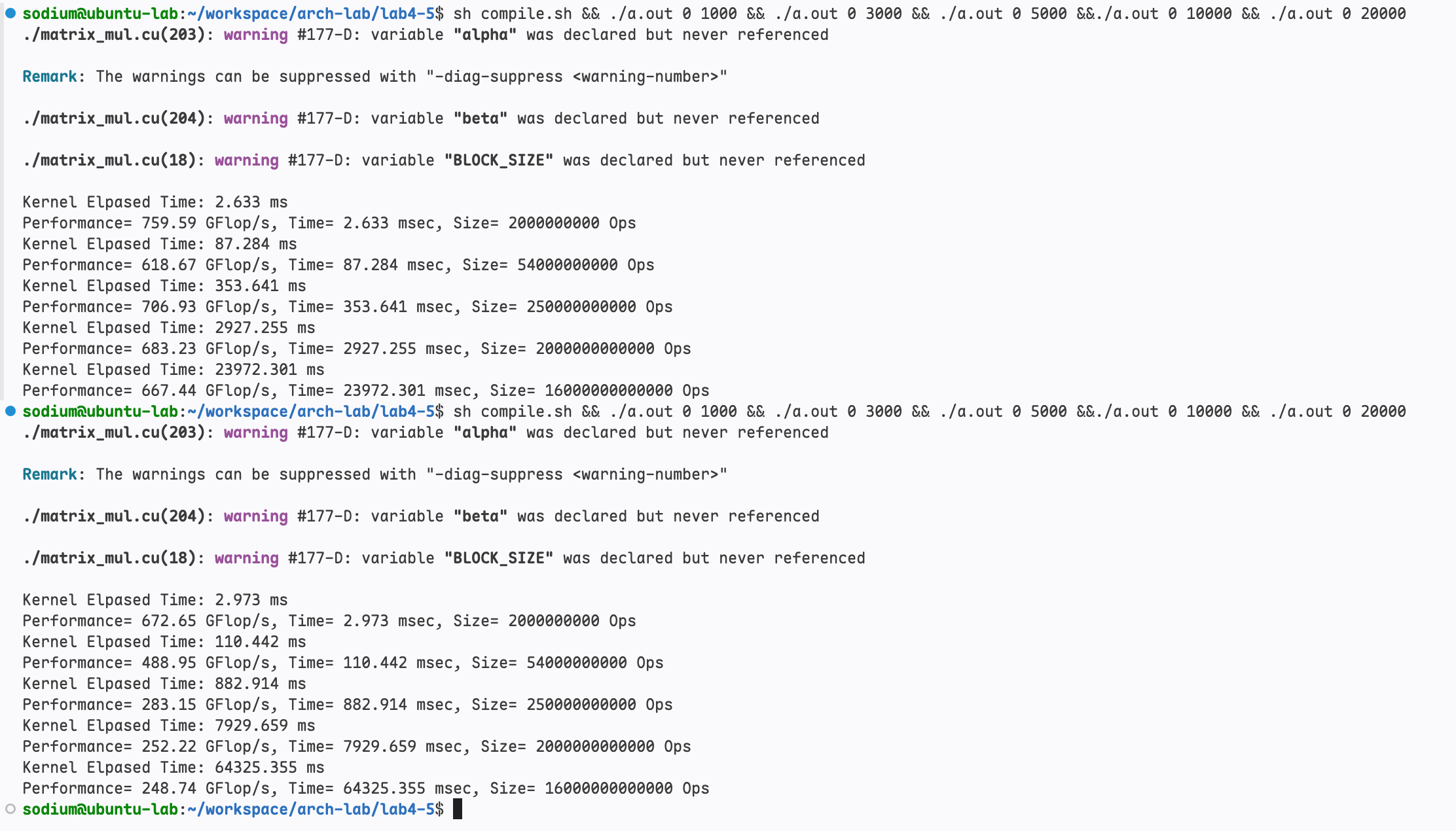
# TILE_WIDTH = 32
Kernel Elpased Time: 2.633 ms
Performance= 759.59 GFlop/s, Time= 2.633 msec, Size= 2000000000 Ops
Kernel Elpased Time: 87.284 ms
Performance= 618.67 GFlop/s, Time= 87.284 msec, Size= 54000000000 Ops
Kernel Elpased Time: 353.641 ms
Performance= 706.93 GFlop/s, Time= 353.641 msec, Size= 250000000000 Ops
Kernel Elpased Time: 2927.255 ms
Performance= 683.23 GFlop/s, Time= 2927.255 msec, Size= 2000000000000 Ops
Kernel Elpased Time: 23972.301 ms
Performance= 667.44 GFlop/s, Time= 23972.301 msec, Size= 16000000000000 Ops

# TILE_WIDTH = 8
Kernel Elpased Time: 2.973 ms
Performance= 672.65 GFlop/s, Time= 2.973 msec, Size= 2000000000 Ops
Kernel Elpased Time: 110.442 ms
Performance= 488.95 GFlop/s, Time= 110.442 msec, Size= 54000000000 Ops
Kernel Elpased Time: 882.914 ms
Performance= 283.15 GFlop/s, Time= 882.914 msec, Size= 250000000000 Ops
Kernel Elpased Time: 7929.659 ms
Performance= 252.22 GFlop/s, Time= 7929.659 msec, Size= 2000000000000 Ops
Kernel Elpased Time: 64325.355 ms
Performance= 248.74 GFlop/s, Time= 64325.355 msec, Size= 16000000000000 Ops

# TILE_WIDTH = 16
Kernel Elpased Time: 2.512 ms
Performance= 796.16 GFlop/s, Time= 2.512 msec, Size= 2000000000 Ops
Kernel Elpased Time: 79.151 ms
Performance= 682.24 GFlop/s, Time= 79.151 msec, Size= 54000000000 Ops
Kernel Elpased Time: 354.981 ms
Performance= 704.26 GFlop/s, Time= 354.981 msec, Size= 250000000000 Ops
Kernel Elpased Time: 2744.393 ms
Performance= 728.76 GFlop/s, Time= 2744.393 msec, Size= 2000000000000 Ops
Kernel Elpased Time: 23105.869 ms
Performance= 692.46 GFlop/s, Time= 23105.869 msec, Size= 16000000000000 Ops
汇总信息如下
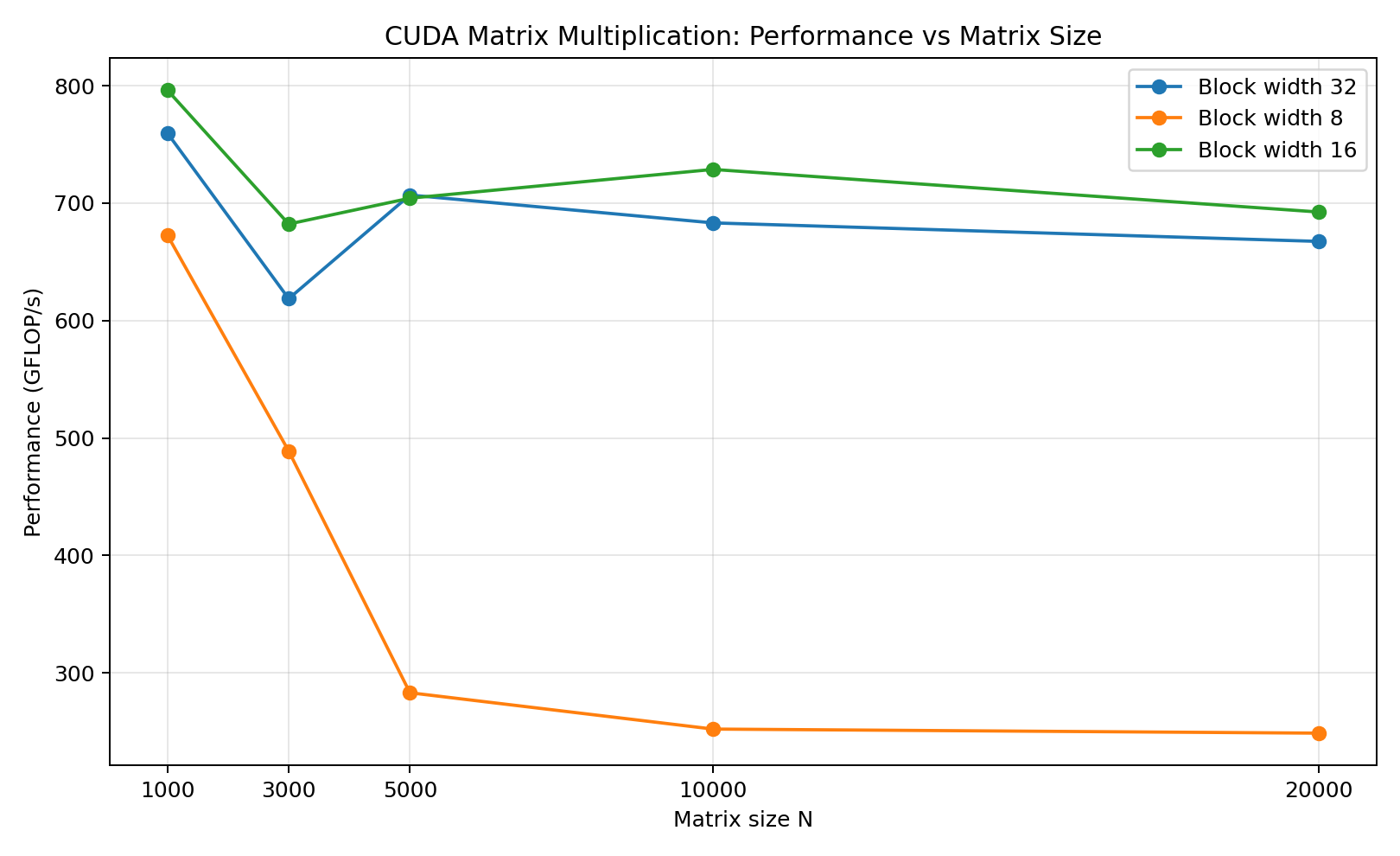
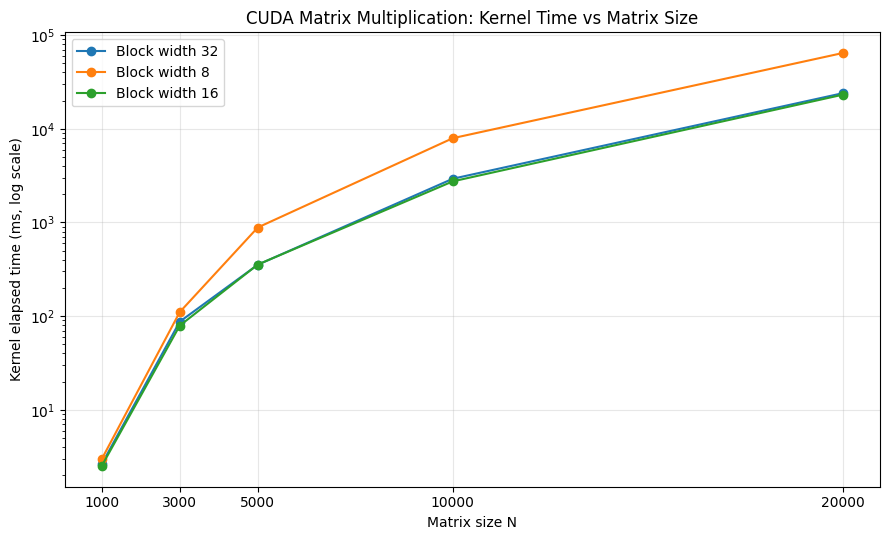
下面是可以直接复制到实验报告中的 Markdown 表格,汇总了不同 Block Width 下各矩阵规模的 Kernel 执行时间与计算性能。
CUDA 矩阵乘法性能对比
| 矩阵规模 $N$ | 运算量(FLOPs) | Block Width = 8 时间 (ms) | 性能 (GFLOP/s) | Block Width = 16 时间 (ms) | 性能 (GFLOP/s) | Block Width = 32 时间 (ms) | 性能 (GFLOP/s) |
|---|---|---|---|---|---|---|---|
| 1000 | $2\times10^9$ | 2.973 | 672.65 | 2.512 | 796.16 | 2.633 | 759.59 |
| 3000 | $54\times10^9$ | 110.442 | 488.95 | 79.151 | 682.24 | 87.284 | 618.67 |
| 5000 | $250\times10^9$ | 882.914 | 283.15 | 354.981 | 704.26 | 353.641 | 706.93 |
| 10000 | $2\times10^{12}$ | 7929.659 | 252.22 | 2744.393 | 728.76 | 2927.255 | 683.23 |
| 20000 | $16\times10^{12}$ | 64325.355 | 248.74 | 23105.869 | 692.46 | 23972.301 | 667.44 |
结论
- Block Width = 8:随着矩阵规模增大,性能明显下降,在大规模矩阵上远逊于另外两组配置。
- Block Width = 16:整体表现较好,在 $N=1000、3000、10000、20000$ 时取得了三组配置中的最佳性能。
- Block Width = 32:在 $N=5000$ 时略优于 Width = 16,但在其他规模下表现较差。
- 总体来看,Block Width = 16 是这组实验中更合适的配置。
这里的 Block Width 指二维线程块的单边尺寸,因此三组配置分别对应每个 Block 中 $8^2=64$、$16^2=256$、$32^2=1024$ 个线程
实验五:使用共享内存优化 GPU 代码
实验五和实验四用的是同一份实验包,不需要重新下载
原本各个线程访问的是全局内存,速度较慢,而共享内存可以让同一线程块内共享数据,访问速度也更快。
实验五的任务如下
- 利用 GPU 共享内存实现矩阵计算优化
- 对比相同矩阵规模下的计算时间和效率,验证共享内存的加速效果
- 调整 BLOCKSIZE,对比其对运算效率的影响
- 利用 cublasSgemm 计算矩阵乘法结果,对比实验结果
模版代码的思路如下
- 每个线程对应矩阵 C 中一个元素
- 每个线程块相当于一个矩阵分块
- 每个线程都加载两个分块矩阵 A 和 B 中的一个元素
A'[j][i]和B'[j][i],每个线程块都能够加载完全部元素 - 索引分为线程块索引和块内索引
- 线程块索引是位于线程块左上角的线程的索引值
- 块内线程索引则是块内线程相对于线程块索引的偏移量
假设矩阵块 (X, 1) 内有一线程 (1,2),假设矩阵 C 列数为 N ,那么线程块索引应该是 [1*BLOCKSIZE][X*BLOCKSIZE] 或者 (1*N+X)*BLOCKSIZE;
而块内索引很显然是 [2][1] 或者 2N+1,所以总的索引是 [1*BLOCKSIZE+2][X*BLOCKSIZE+1] 或者 (1*N+X)*BLOCKSIZE + 2N+1
代码实现
下面是补完后的模版代码
矩阵块 (bx, by) 对应的线程块索引是 [by*BLOCKSIZE][bx*BLOCKSIZE] 或者 by*w*BLOCKSIZE + bx*BLOCKSIZE
块内索引 (tx, ty) 对应的总索引是 [by*BLOCKSIZE+ty][bx*BLOCKSIZE+tx] 或者 by*w*BLOCKSIZE + bx*BLOCKSIZE + tx+ty*w
const int BLOCK_SIZE = TILE_WIDTH;
__global__ void MatrixMulSharedMemKernel(float *A,
    float *B, float *C, int wA,
    int wB) {
  // Block index (bx, by)
  int bx = blockIdx.x;
  int by = blockIdx.y;

  // Thread index (tx, ty)
  int tx = threadIdx.x;
  int ty = threadIdx.y;

  // Index of the first sub-matrix of A processed by the block
  int aBegin = wA * BLOCK_SIZE * by;
  // Index of the last sub-matrix of A processed by the block
  int aEnd   = aBegin + wA - 1;
  // Step size used to iterate through the sub-matrices of A
  int aStep  = BLOCK_SIZE;
  // Index of the first sub-matrix of B processed by the block
  int bBegin = BLOCK_SIZE * bx;
  // Step size used to iterate through the sub-matrices of B
  int bStep  = BLOCK_SIZE * wB;
  // Csub is used to store the element of the block sub-matrix
  // that is computed by the thread
  float Csub = 0;

  // Loop over all the sub-matrices of A and B
  // required to compute the block sub-matrix
  for (int a = aBegin, b = bBegin;
       a <= aEnd;
       a += aStep, b += bStep) {
    // Declaration of the shared memory array As used to
    // store the sub-matrix of A
    __shared__ float As[BLOCK_SIZE][BLOCK_SIZE];

    // Declaration of the shared memory array Bs used to
    // store the sub-matrix of B
    __shared__ float Bs[BLOCK_SIZE][BLOCK_SIZE];

    // Load the matrices from device memory
    // to shared memory; each **thread** loads
    // one element of each matrix
    // --- TO DO :Load the elements of the sub-matrix of A into As ---
    // ---        Load the elements of the sub-matrix of B into Bs ---
    // NOTE: Ensure that the thread indices do not exceed the matrix dimensions to avoid out-of-bounds access.
    //       Use boundary checks to load valid elements into shared memory, and set invalid elements to 0.0f
    int aRow = by * BLOCK_SIZE + ty;
    int aCol = (a - aBegin) + tx;
    if (aRow < wA && aCol < wA) {
      As[ty][tx] = A[a + ty * wA + tx];
    } else {
      As[ty][tx] = 0.0f;
    }

    int bRow = (a - aBegin) + ty;
    int bCol = bx * BLOCK_SIZE + tx;
    if (bRow < wA && bCol < wB) {
      Bs[ty][tx] = B[b + ty * wB + tx];
    } else {
      Bs[ty][tx] = 0.0f;
    }
    // Synchronize to make sure the matrices are loaded
    __syncthreads();

    // Multiply the two matrices together;
    // each thread computes one element
    // of the block sub-matrix
#pragma unroll
    // --- TO DO :Implement the matrix multiplication using the sub-matrices As and Bs ---
    for (int i=0; i<BLOCK_SIZE; i++) {
      Csub += As[ty][i] * Bs[i][tx];
    }
    // Synchronize to make sure that the preceding
    // computation is done before loading two new
    // sub-matrices of A and B in the next iteration
    __syncthreads();
  }

  // Write the block sub-matrix to device memory;
  // each thread writes one element
  int c = wB * BLOCK_SIZE * by + BLOCK_SIZE * bx;
  // --- TO DO :Store the computed Csub result into matrix C ---
  // NOTE: Ensure that the thread indices "c" do not exceed the matrix dimensions to avoid out-of-bounds access.
  //       Use boundary checks to write valid elements to the output matrix C.
  int cRow = by * BLOCK_SIZE + ty;
  int cCol = bx * BLOCK_SIZE + tx;
  if (cRow < wA && cCol < wB) {
    C[c + ty * wB + tx] = Csub;
  }
}
共享内存结果
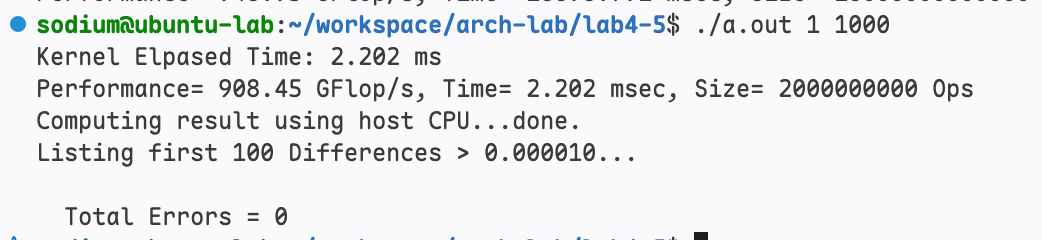
计算结果没有问题。
对比 Block Size=8,16,32 的情况(从上到下)
sh compile.sh && ./a.out 0 1000 && ./a.out 0 3000 && ./a.out 0 5000 &&./a.out 0 10000 && ./a.out 0 20000
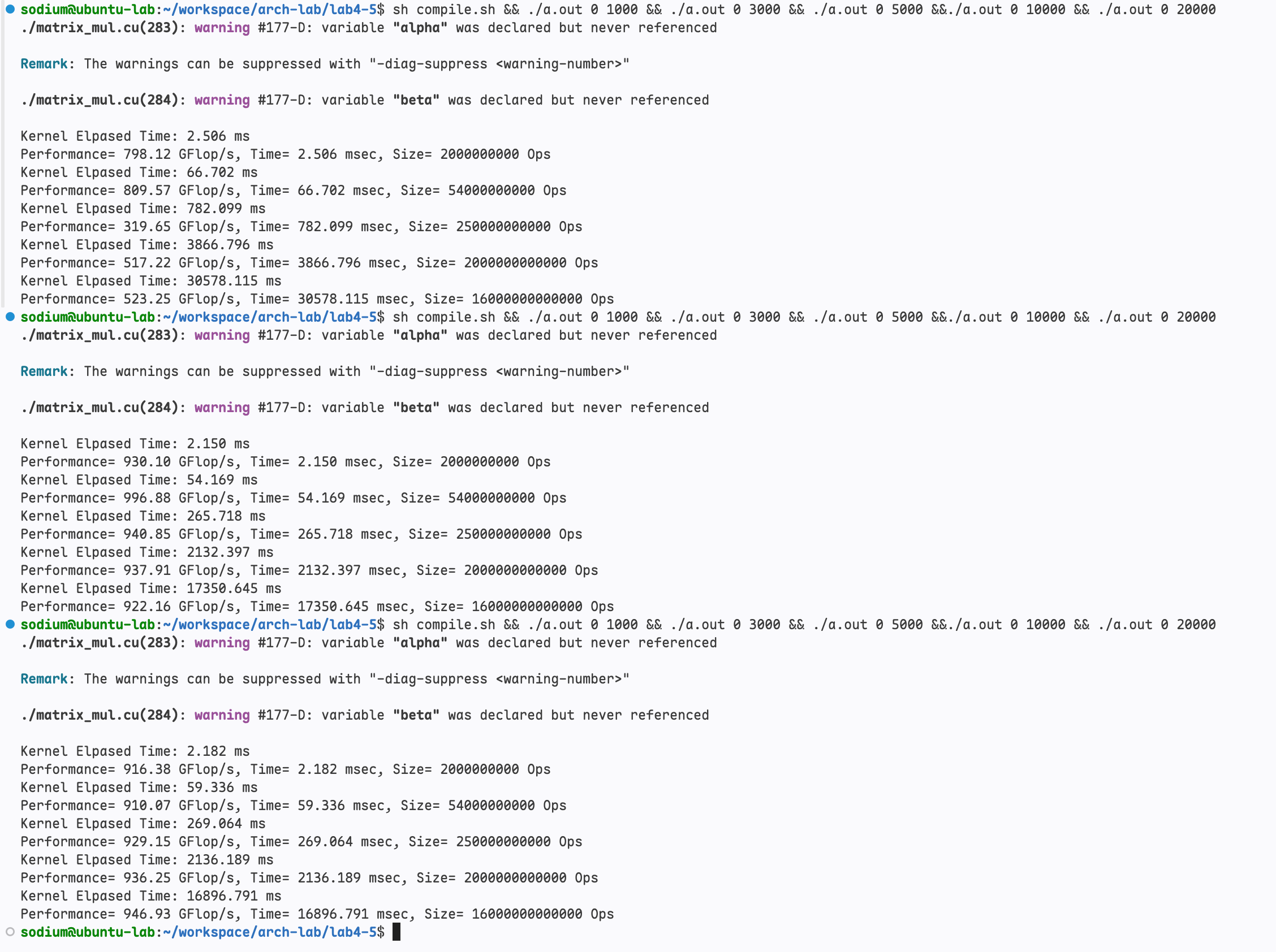
测试环境:NVIDIA GeForce RTX 4060 Laptop GPU(8 GB,驱动 595.99.02,CUDA 12.0),编译参数 nvcc -arch=sm_89 -L/usr/local/cuda/lib64 -lcublas。截图中每个数据都是 nIter = 5 的平均值(cudaEvent 计时),性能按 $2N^3/t$ 计算。这些是单次运行的结果:同一会话内重复运行波动通常 <1%,但笔记本 GPU 的 boost 频率受供电和功耗状态影响,不同批次的绝对值可能相差约 20%,因此文末补充了多次重复测试(取中位数)的结果。
共享内存性能数据
lab5-1.png 是 ./a.out 1 1000 的正确性检查:计算耗时 2.202 ms、性能 908.45 GFLOP/s,Total Errors = 0。
lab5-2.png 中三次运行(从上到下为 Block=8、16、32)的数据整理如下:
| 矩阵规模 $N$ | 运算量(FLOPs) | Block=8 时间 / 性能 | Block=16 时间 / 性能 | Block=32 时间 / 性能 |
|---|---|---|---|---|
| 1000 | $2\times10^9$ | 2.506 ms / 798.12 GFLOP/s | 2.150 ms / 930.10 GFLOP/s | 2.182 ms / 916.38 GFLOP/s |
| 3000 | $5.4\times10^{10}$ | 66.702 ms / 809.57 GFLOP/s | 54.169 ms / 996.88 GFLOP/s | 59.336 ms / 910.07 GFLOP/s |
| 5000 | $2.5\times10^{11}$ | 782.099 ms / 319.65 GFLOP/s | 265.718 ms / 940.85 GFLOP/s | 269.064 ms / 929.15 GFLOP/s |
| 10000 | $2\times10^{12}$ | 3866.796 ms / 517.22 GFLOP/s | 2132.397 ms / 937.91 GFLOP/s | 2136.189 ms / 936.25 GFLOP/s |
| 20000 | $1.6\times10^{13}$ | 30578.115 ms / 523.25 GFLOP/s | 17350.645 ms / 922.16 GFLOP/s | 16896.791 ms / 946.93 GFLOP/s |
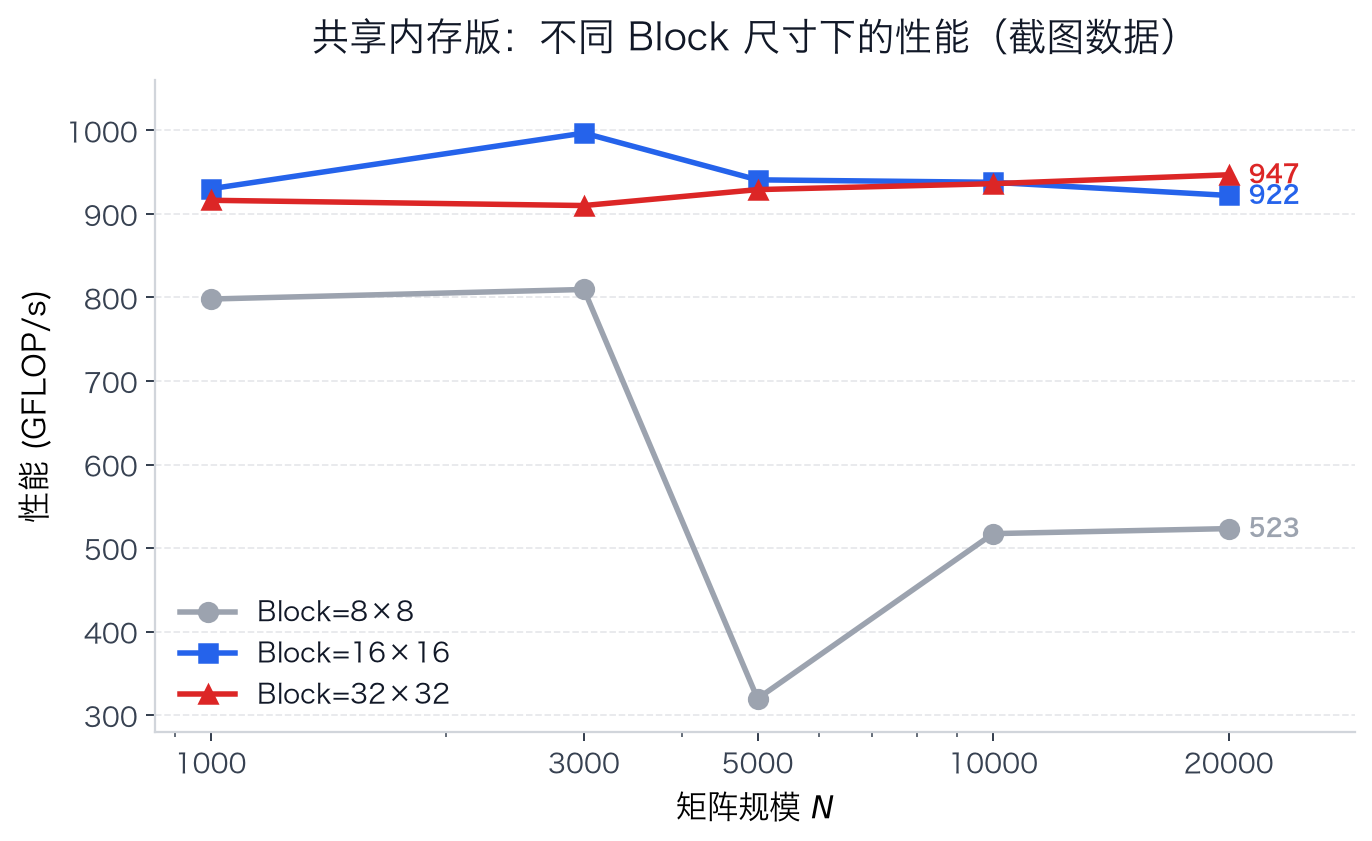
从截图数据可以看到:Block=16 与 Block=32 的性能接近(均约 900~1000 GFLOP/s),而 Block=8 在 $N=5000$ 时突然跌到约 320 GFLOP/s,之后回升到约 500 GFLOP/s,明显劣于另外两种配置。
USE_CUBLAS
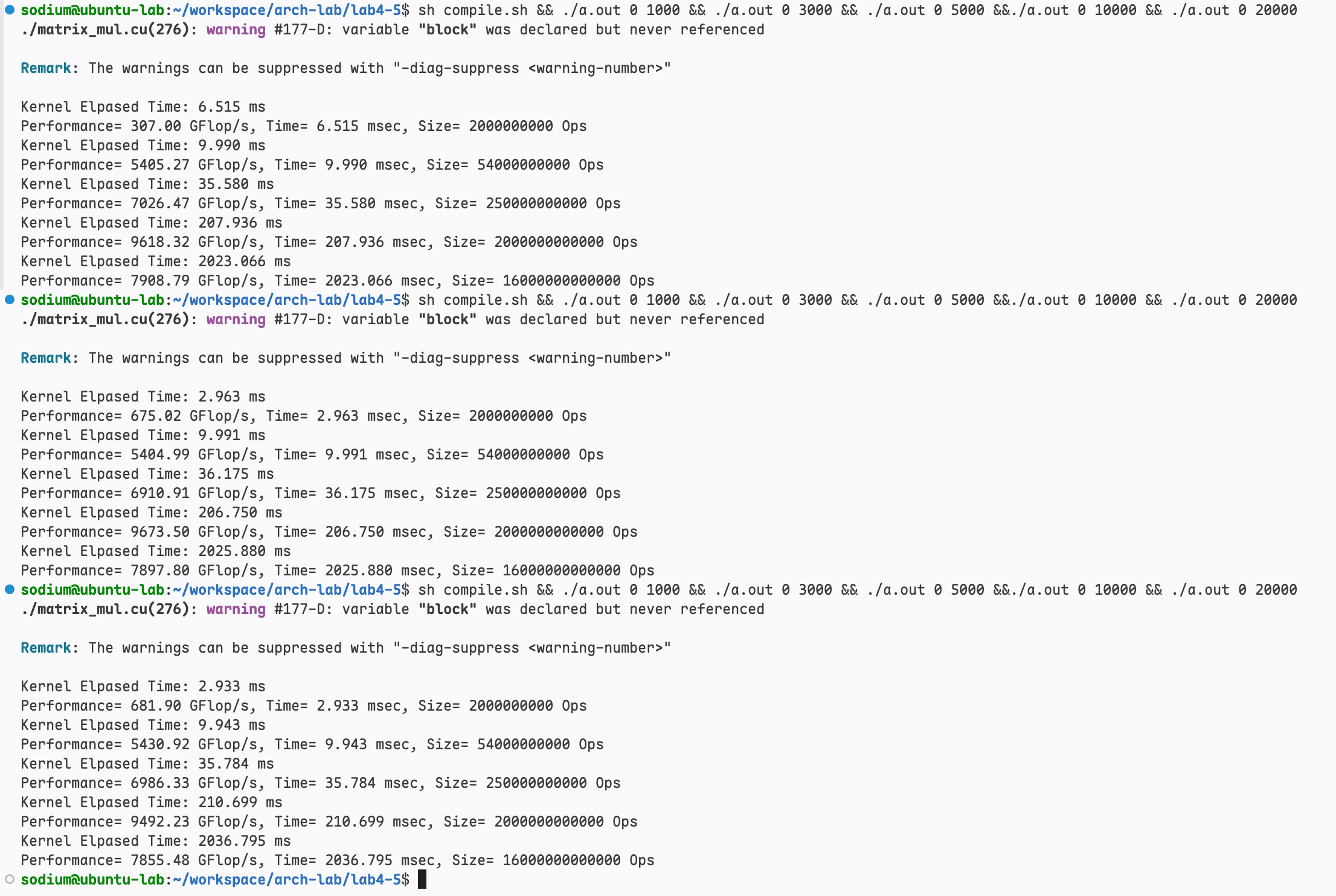
将手写共享内存版本替换成调用 cublasSgemm 进行同样的三种尺寸8,16,32(从上到下)的测试结果如下
cuBLAS 性能数据
lab5-3.png 是对 Block=8、16、32 三种尺寸(从上到下)分别调用 cublasSgemm 的测试结果。注意 cuBLAS 本身不使用 Block 尺寸,编译日志里 variable "block" was never referenced 也说明了这一点,因此三组的差异只来自运行噪声:
| 矩阵规模 $N$ | Block=8 时间 / 性能 | Block=16 时间 / 性能 | Block=32 时间 / 性能 |
|---|---|---|---|
| 1000 | 6.515 ms / 307.00 GFLOP/s | 2.963 ms / 675.02 GFLOP/s | 2.933 ms / 681.90 GFLOP/s |
| 3000 | 9.990 ms / 5405.27 GFLOP/s | 9.991 ms / 5404.99 GFLOP/s | 9.943 ms / 5430.92 GFLOP/s |
| 5000 | 35.580 ms / 7026.47 GFLOP/s | 36.175 ms / 6910.91 GFLOP/s | 35.784 ms / 6986.33 GFLOP/s |
| 10000 | 207.936 ms / 9618.32 GFLOP/s | 206.750 ms / 9673.50 GFLOP/s | 210.699 ms / 9492.23 GFLOP/s |
| 20000 | 2023.066 ms / 7908.79 GFLOP/s | 2025.880 ms / 7897.80 GFLOP/s | 2036.795 ms / 7855.48 GFLOP/s |
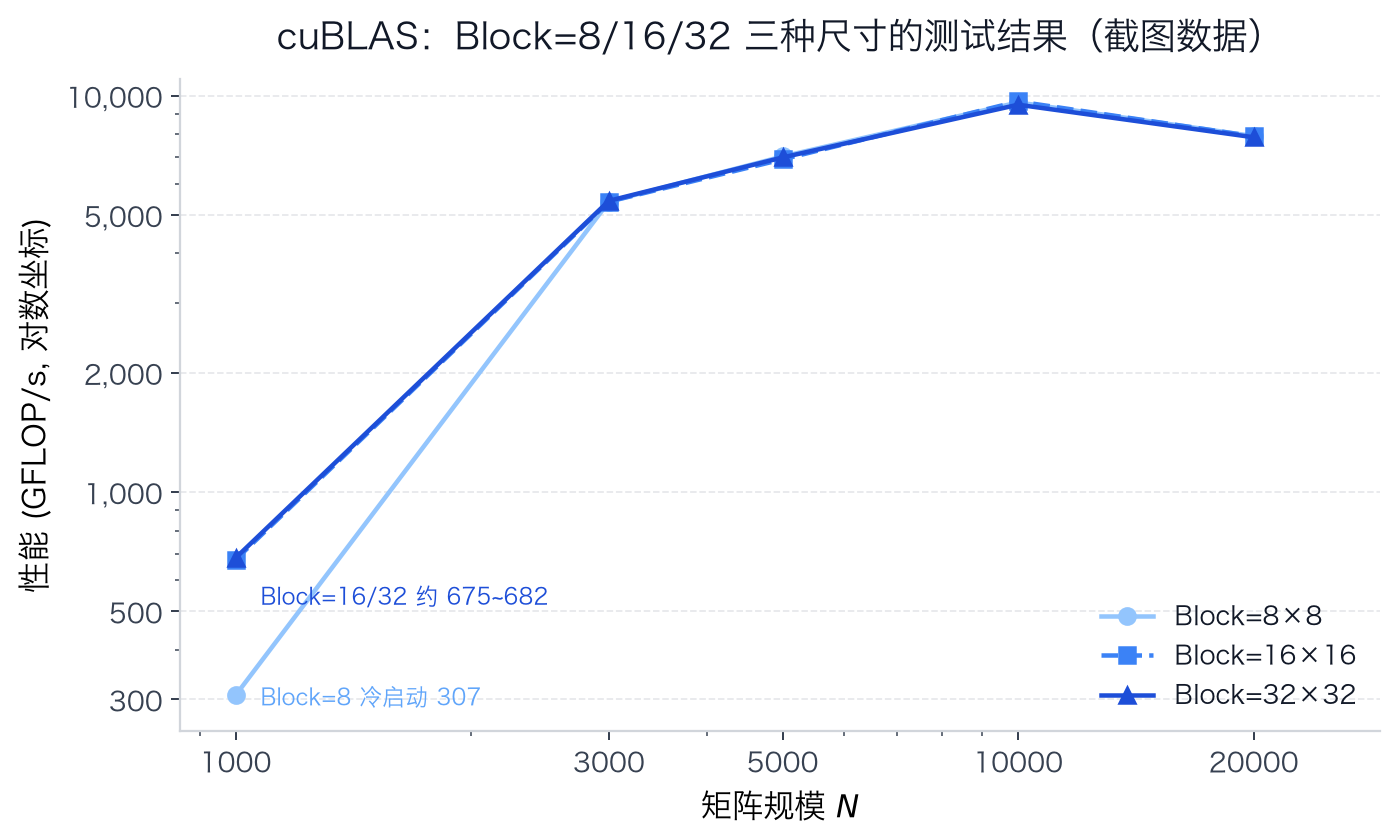
三组结果在中大规模上几乎完全重合(差异 <2%),可见 Block 尺寸对 cuBLAS 没有影响;只有第一组(Block=8)在 $N=1000$ 时偏慢(6.515 ms),这是三次测试中的第一次运行,包含 cublas handle 创建与时钟爬升的冷启动开销。以相同 Block=16 配置对比同截图的共享内存版:
| 矩阵规模 $N$ | 共享内存 Block=16 (ms) | cuBLAS Block=16 (ms) | 加速比 |
|---|---|---|---|
| 1000 | 2.150 | 2.963 | 0.73× |
| 3000 | 54.169 | 9.991 | 5.42× |
| 5000 | 265.718 | 36.175 | 7.35× |
| 10000 | 2132.397 | 206.750 | 10.31× |
| 20000 | 17350.645 | 2025.880 | 8.56× |
多次重复测试(取中位数)
上面的截图都是单次运行的结果(其中 cuBLAS 那张是 Block=8/16/32 三种尺寸各测一次)。为了更准确地得到 加速比 ,这里在 同一时段、同一供电状态(AC) 下重新做了一轮完整测试:
- 覆盖 全局内存 / 共享内存 / cuBLAS 三种方案,其中两种手写 kernel(全局内存版
MatrixMulKernel与共享内存版MatrixMulSharedMemKernel)各测 Block=8、16、32 三种尺寸; - 矩阵规模 $N=1000、3000、5000、10000、20000$;每个配置独立进程运行多次取中位数:$N \le 5000$ 重复 5 次,$N=10000、20000$ 重复 3 次;
- 另外补充整数倍 Block 尺寸的矩阵规模($N=1024、2048、4096$,都是 8/16/32 的整数倍,无边界分支)下的 cuBLAS 测试,各重复 5 次;
- 所有配置交替测量(同一轮内依次跑完所有配置),因此同一矩阵规模下的不同方案可以直接相除得到加速比。
- 运行期间 GPU 满载采样:SM 时钟 2160–2610 MHz(中位数 2505 MHz),温度 50–89 °C,功耗 31–109 W(AC 供电)。
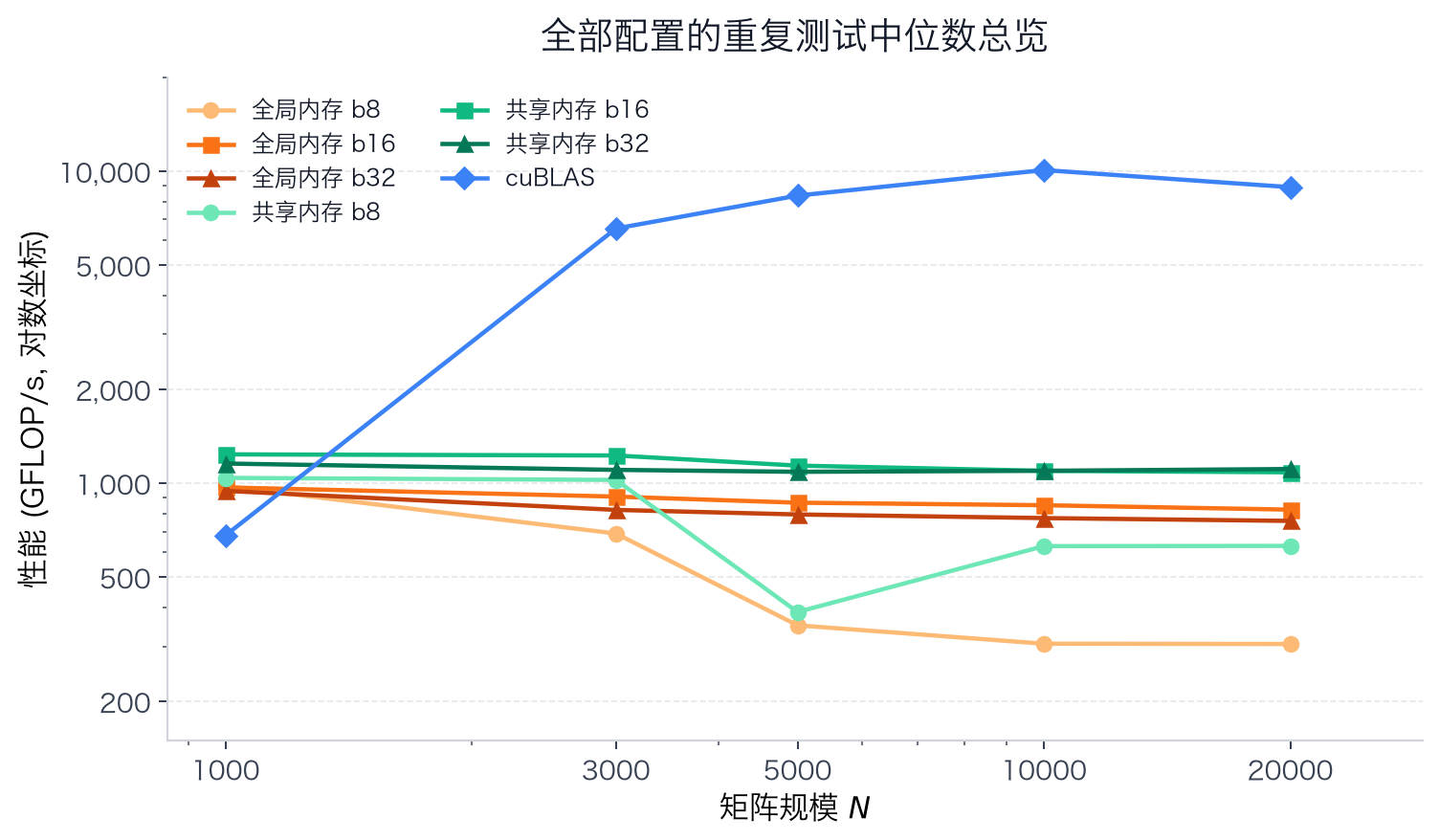
上图把 7 个配置放在一起对比(纵轴对数坐标):cuBLAS 在中大规模明显高于两种手写 kernel(全局内存/共享内存);全局内存的 Block=8 在大规模下最低。下面分方案给出数值与加速比。
全局内存:Block=8/16/32
| 矩阵规模 $N$ | 运算量(FLOPs) | Block=8 时间 / 性能 | Block=16 时间 / 性能 | Block=32 时间 / 性能 |
|---|---|---|---|---|
| 1000 | $2\times10^9$ | 2.044 ms / 978.31 GFLOP/s | 2.063 ms / 969.43 GFLOP/s | 2.116 ms / 945.05 GFLOP/s |
| 3000 | $5.4\times10^{10}$ | 78.292 ms / 689.73 GFLOP/s | 59.612 ms / 905.86 GFLOP/s | 65.757 ms / 821.21 GFLOP/s |
| 5000 | $2.5\times10^{11}$ | 713.661 ms / 350.31 GFLOP/s | 288.706 ms / 865.93 GFLOP/s | 314.862 ms / 794.00 GFLOP/s |
| 10000 | $2\times10^{12}$ | 6537.577 ms / 305.92 GFLOP/s | 2353.115 ms / 849.94 GFLOP/s | 2587.246 ms / 773.02 GFLOP/s |
| 20000 | $1.6\times10^{13}$ | 52422.992 ms / 305.21 GFLOP/s | 19448.369 ms / 822.69 GFLOP/s | 21133.125 ms / 757.11 GFLOP/s |
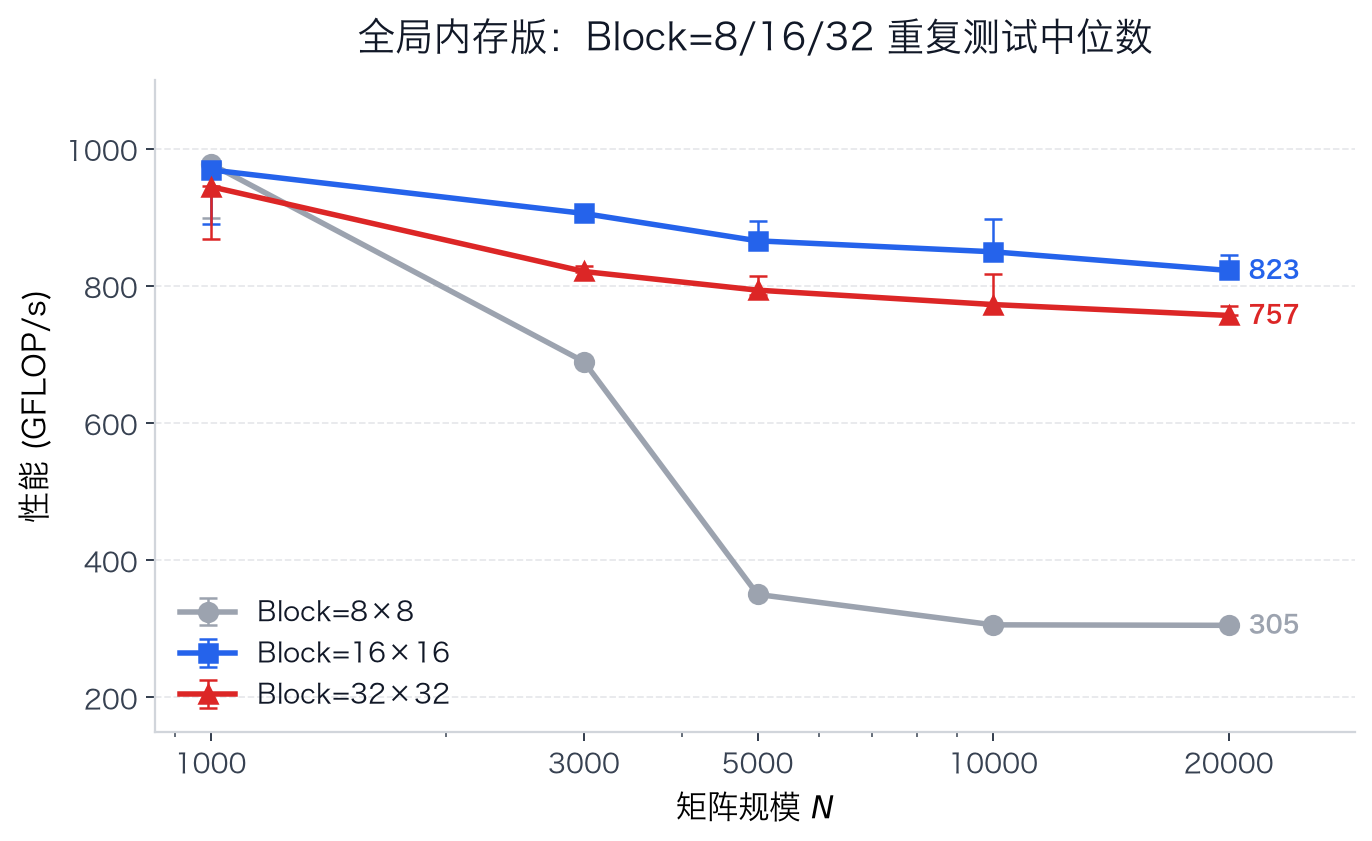
全局内存版 Block=16 在 $N \ge 3000$ 时最优;$N=1000$ 时三种配置都接近 2 ms(Block=8 甚至略快),但 Block=8 在大规模下性能下降明显。
共享内存:Block=8/16/32
| 矩阵规模 $N$ | 运算量(FLOPs) | Block=8 时间 / 性能 | Block=16 时间 / 性能 | Block=32 时间 / 性能 |
|---|---|---|---|---|
| 1000 | $2\times10^9$ | 1.923 ms / 1039.91 GFLOP/s | 1.617 ms / 1237.03 GFLOP/s | 1.730 ms / 1156.11 GFLOP/s |
| 3000 | $5.4\times10^{10}$ | 52.710 ms / 1024.48 GFLOP/s | 44.012 ms / 1226.93 GFLOP/s | 48.946 ms / 1103.26 GFLOP/s |
| 5000 | $2.5\times10^{11}$ | 646.895 ms / 386.46 GFLOP/s | 219.558 ms / 1138.65 GFLOP/s | 229.823 ms / 1087.79 GFLOP/s |
| 10000 | $2\times10^{12}$ | 3181.877 ms / 628.56 GFLOP/s | 1825.446 ms / 1095.62 GFLOP/s | 1824.961 ms / 1095.91 GFLOP/s |
| 20000 | $1.6\times10^{13}$ | 25416.621 ms / 629.51 GFLOP/s | 14763.044 ms / 1083.79 GFLOP/s | 14412.565 ms / 1110.14 GFLOP/s |
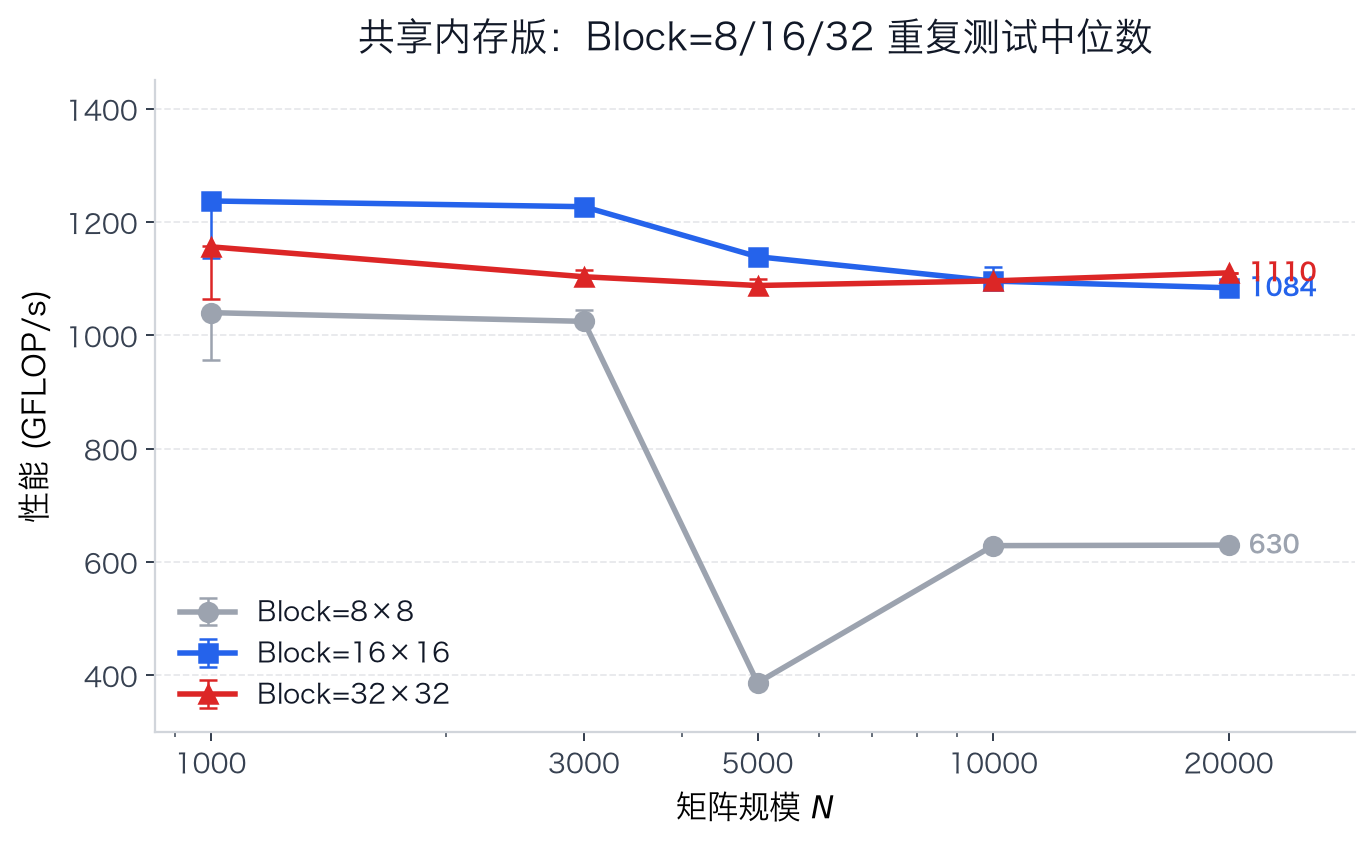
共享内存版 Block=16 在 $N \le 10000$ 时最优,$N=20000$ 时 Block=32 略优;Block=8 在 $N=5000$ 处的性能塌陷稳定复现。
补充:Block=8 在 N=5000 附近的异常
共享内存版 Block=8 在 $N=5000$ 处掉到 386 GFLOP/s($N=3000$ 为 1024、$N=10000$ 为 629),这个点不是测量噪声:截图数据(782.099 ms / 319.65 GFLOP/s)、第一次重复测试(646.895 ms / 386.46 GFLOP/s)和本次 3 次重复(386.31 / 386.20 / 385.94 GFLOP/s)都指向同一结果。
为了确认它是不是单点噪声,又额外扫描了 $N=3500\sim8000$(Block=8 每个尺寸重复 3 次,重复间波动 <1%;Block=16 只测了部分尺寸作对照):
| 矩阵规模 $N$ | Block=8 (GFLOP/s) | Block=16 (GFLOP/s) |
|---|---|---|
| 3500 | 889 | — |
| 4000 | 806 | 1237 |
| 4500 | 450 | 1033 |
| 4800 | 671 | — |
| 4992 | 689 | — |
| 5000 | 386 | 1138 |
| 5008 | 481 | — |
| 5120 | 768 | — |
| 5500 | 450 | — |
| 6000 | 459 | 1123 |
| 7000 | 348 | 1051 |
| 8000 | 643 | 1139 |
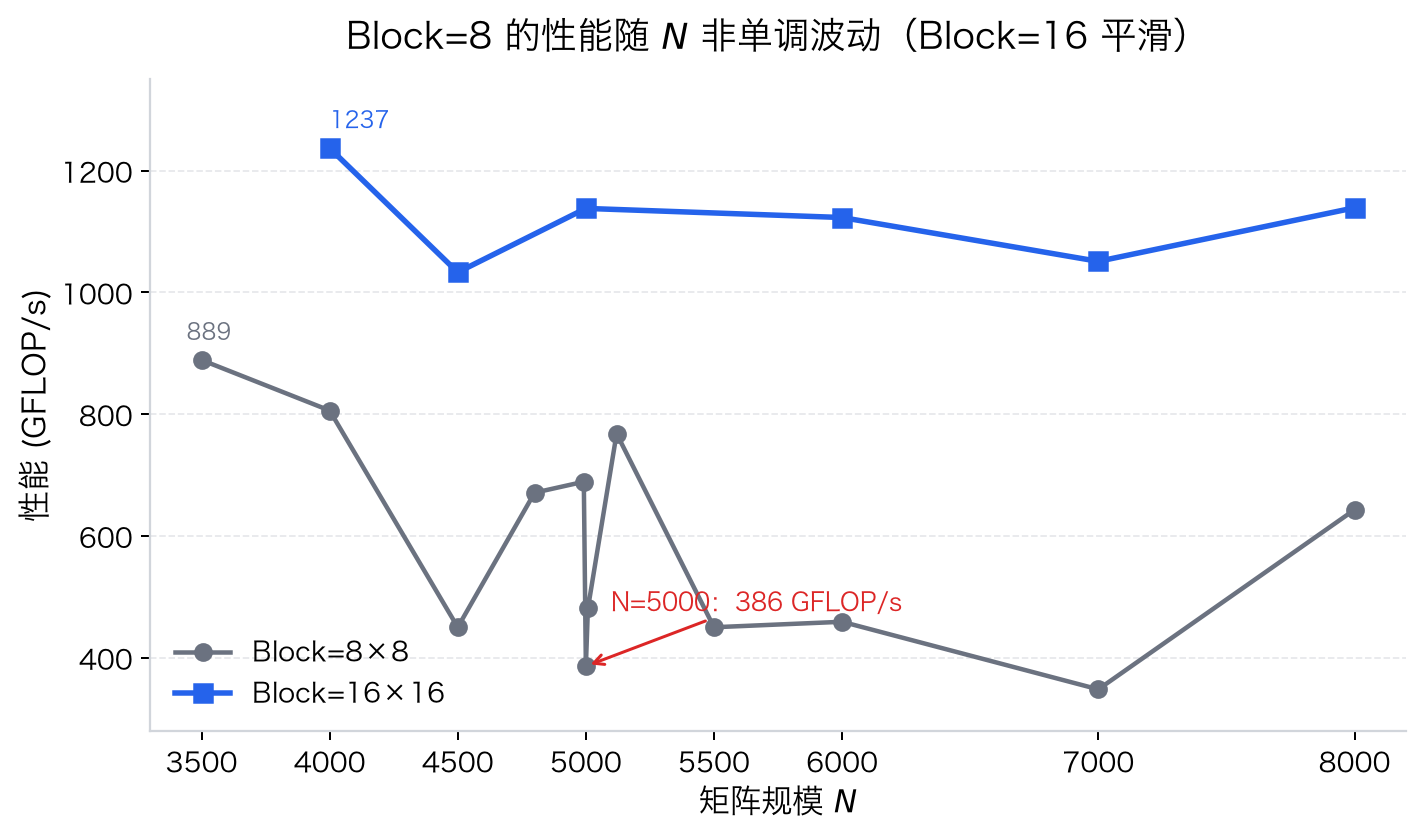
Block=8 的性能随 $N$ 明显非单调波动(346889 GFLOP/s),而 Block=16 在同样范围内一直是 10321238 GFLOP/s、曲线平滑,说明这不是 GPU 频率/温度等整体状态的问题,而是 8×8 tile 特有的访存效应。进一步排查:
- 在临时副本中给
d_M、d_N、d_P之间插入 256 B2 MB 的 padding 改变相对地址后,$N=5000$ 的结果始终是 386387 GFLOP/s,排除了内存分配对齐的影响; - 按「B 矩阵每个 row-block 重读一遍」估算 Block=8 实际拿到的 DRAM 带宽:$N=3000$ 约 256 GB/s(接近峰值),$N=5000$ 约 96 GB/s,$N=10000/20000$ 约 157 GB/s。
可能原因:Block=8 每块只有 64 个线程(2 个 warp)、每行只读 32 B,算术强度最低(约 4 flop/B),其实际可用带宽对行跨度 $N\times4$ 字节如何映射到 DRAM 的 bank/channel 很敏感;$N=5000$ 的行跨度 20000 B 正好落在 bank 并行较差的位置,带宽只有峰值的一半以下,于是出现低谷。Block=16/32 每行读 64 B/128 B,对这种效应不敏感。由于本机没有权限读取 GPU 性能计数器(ncu 需要权限),以上是基于带宽估算和对照实验的分析。
建议:实验结论以 Block=16/32 为主(曲线平滑),Block=8 可以作为「低 Block 尺寸对访存模式最敏感」的补充说明;若必须使用 Block=8,应避开 4500~5500、7000 附近这类「坏尺寸」。
cuBLAS
| 矩阵规模 $N$ | 运算量(FLOPs) | 时间中位数 (ms) | 性能中位数 (GFLOP/s) |
|---|---|---|---|
| 1000 | $2\times10^9$ | 2.941 | 680.11 |
| 3000 | $5.4\times10^{10}$ | 8.244 | 6550.16 |
| 5000 | $2.5\times10^{11}$ | 29.939 | 8350.26 |
| 10000 | $2\times10^{12}$ | 198.380 | 10081.68 |
| 20000 | $1.6\times10^{13}$ | 1800.057 | 8888.61 |
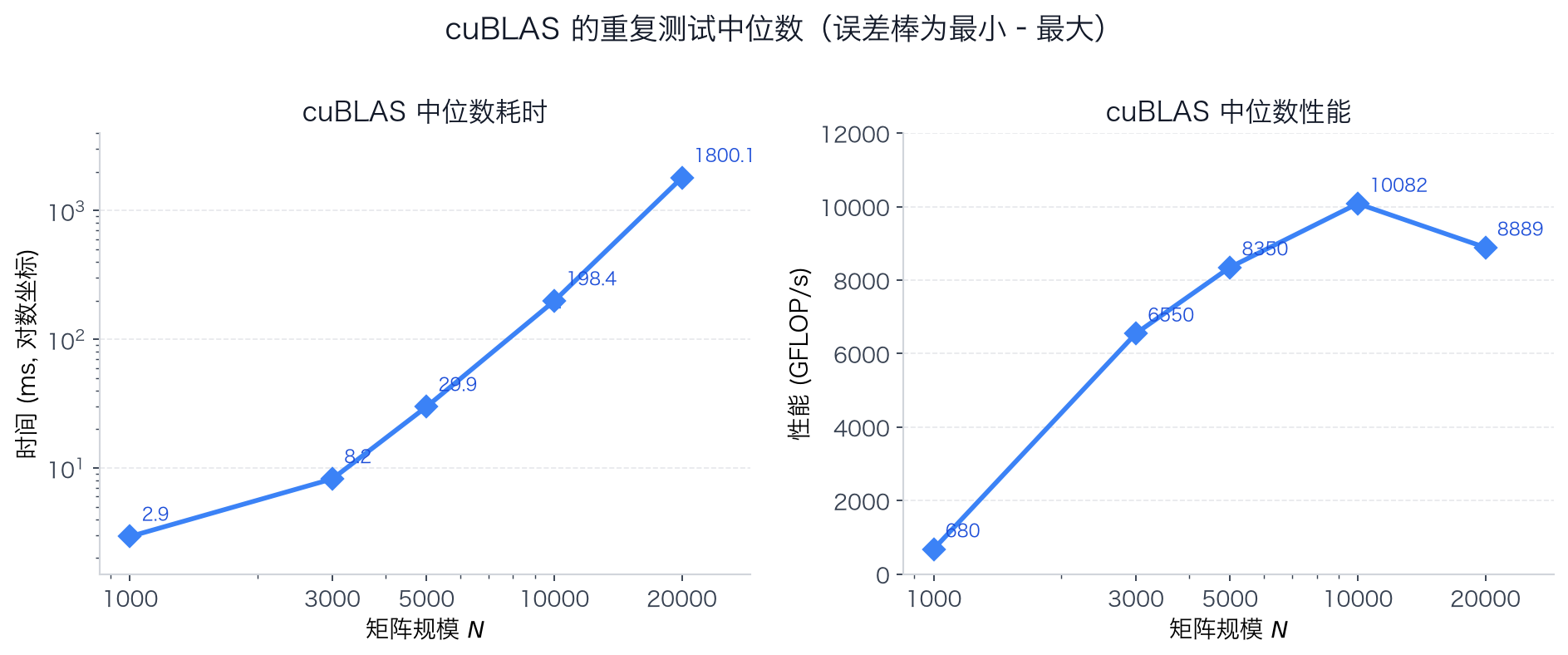
加速比
同一批次、同一矩阵规模下的加速比(全局内存耗时 ÷ 共享内存耗时,>1 表示共享内存更快):
| 矩阵规模 $N$ | Block=8 | Block=16 | Block=32 | 全局最优 ÷ 共享最优 |
|---|---|---|---|---|
| 1000 | 1.06× | 1.28× | 1.22× | 1.26× |
| 3000 | 1.49× | 1.35× | 1.34× | 1.35× |
| 5000 | 1.10× | 1.31× | 1.37× | 1.31× |
| 10000 | 2.05× | 1.29× | 1.42× | 1.29× |
| 20000 | 2.06× | 1.32× | 1.47× | 1.35× |
cuBLAS 相对两种手写实现的加速比(手写 kernel 耗时 ÷ cuBLAS 耗时;两种手写实现分别为全局内存版与共享内存版):
| 矩阵规模 $N$ | 全局 b16 ÷ cuBLAS | 共享 b16 ÷ cuBLAS | 共享最优 ÷ cuBLAS |
|---|---|---|---|
| 1000 | 0.70× | 0.55× | 0.55× |
| 3000 | 7.23× | 5.34× | 5.34× |
| 5000 | 9.64× | 7.33× | 7.33× |
| 10000 | 11.86× | 9.20× | 9.20× |
| 20000 | 10.80× | 8.20× | 8.01× |
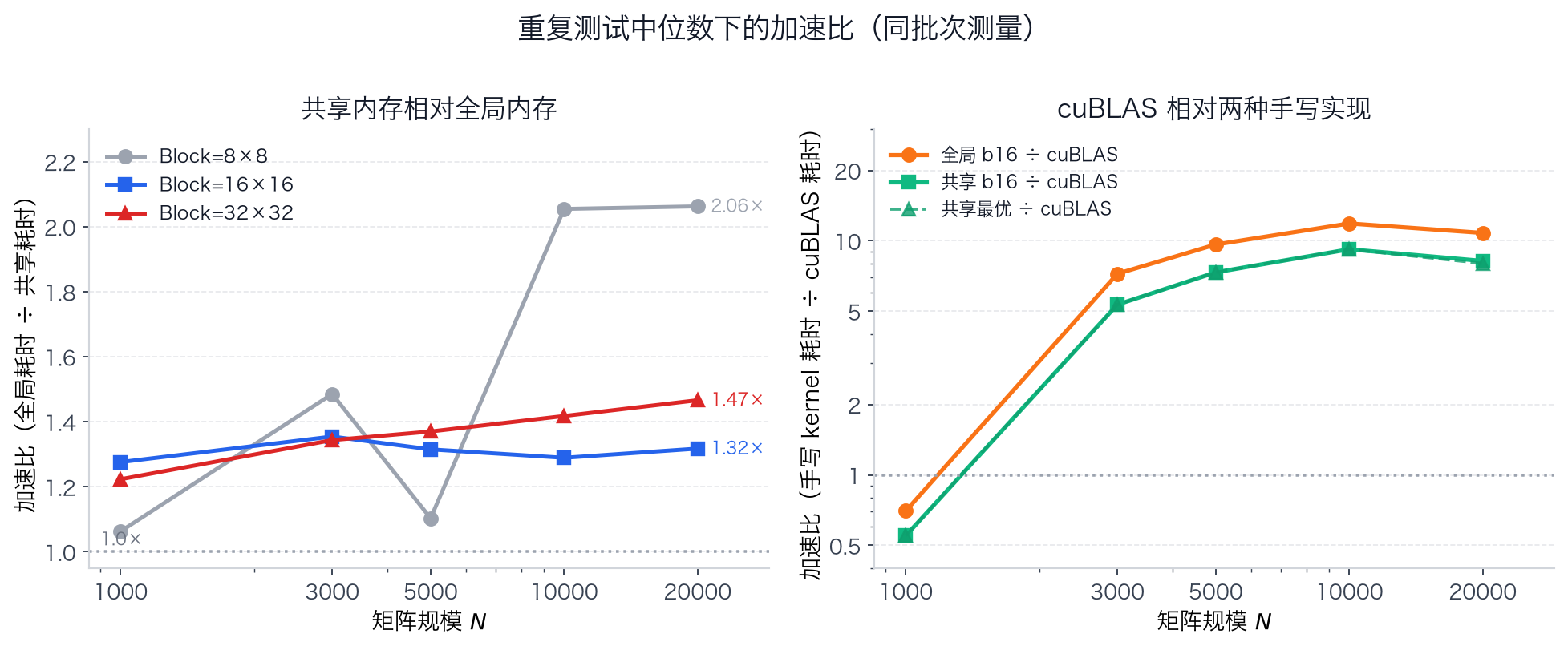
可以看到:Block=16 下共享内存相对全局内存稳定加速 1.28×~1.35×;Block=8 的全局内存版在大规模下退化明显,使加速比在 $N \ge 10000$ 时接近 2×。cuBLAS 在 $N \ge 3000$ 时比共享内存 b16 快 5.3×~9.2×、比全局内存 b16 快 7.2×~11.9×;$N=1000$ 时由于启动开销反而比两种手写 kernel 都慢。
整数倍 Block 尺寸下的 cuBLAS
| 矩阵规模 $N$ | 运算量(FLOPs) | 时间中位数 (ms) | 性能中位数 (GFLOP/s) |
|---|---|---|---|
| 1024 | $2.1\times10^9$ | 2.947 | 728.60 |
| 2048 | $1.7\times10^{10}$ | 4.465 | 3847.70 |
| 4096 | $1.4\times10^{11}$ | 16.648 | 8255.57 |
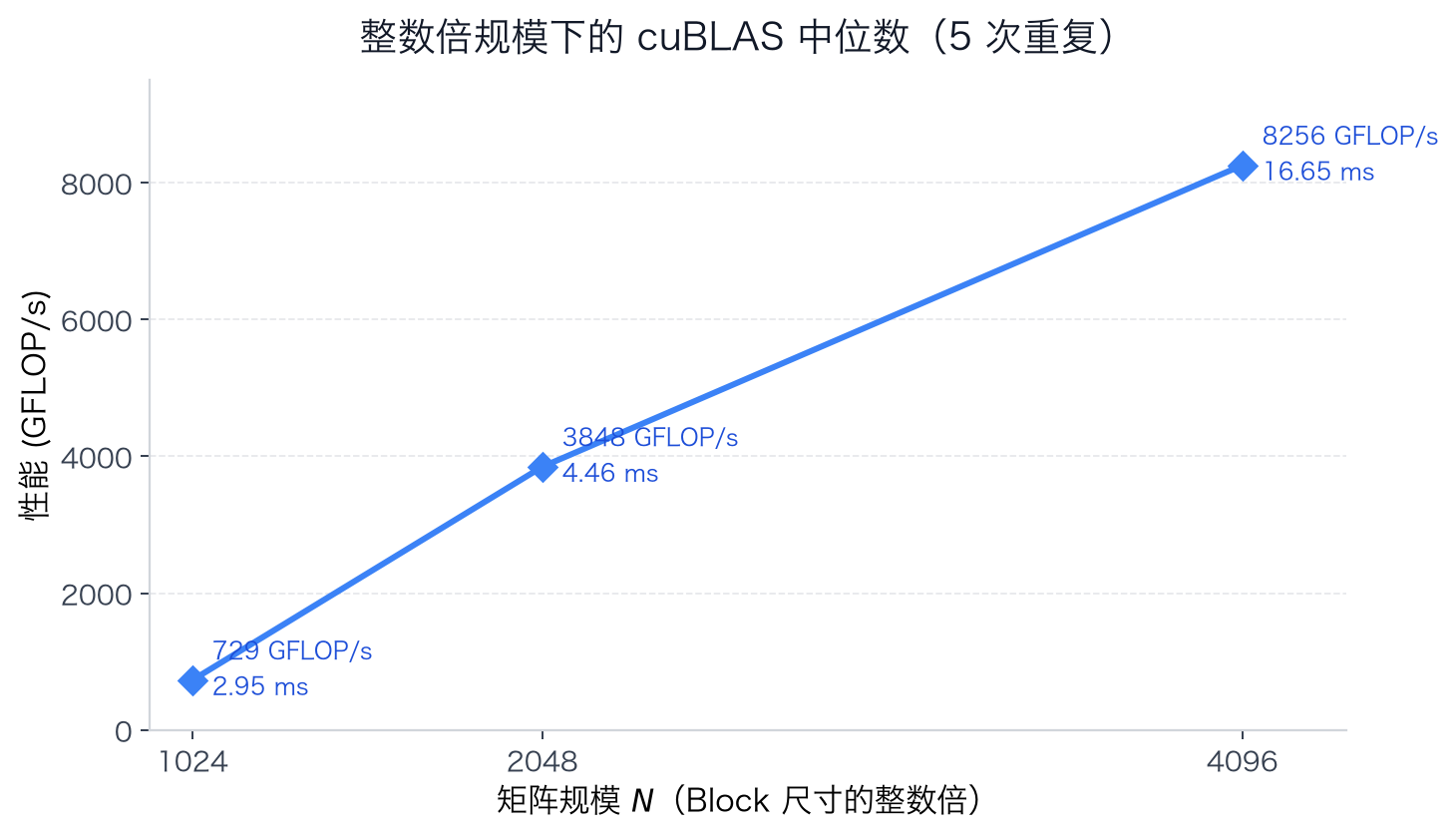
这些尺寸都是 Block 的整数倍、没有边界判断和无效 tile,cuBLAS 的性能随规模增大而提升($N=4096$ 时约 8256 GFLOP/s)。